Football Legacy Manager 25
- 4.0
- Rating
- 10.00K
- Installs
- Free
- Price

 Analysis by App-foxy
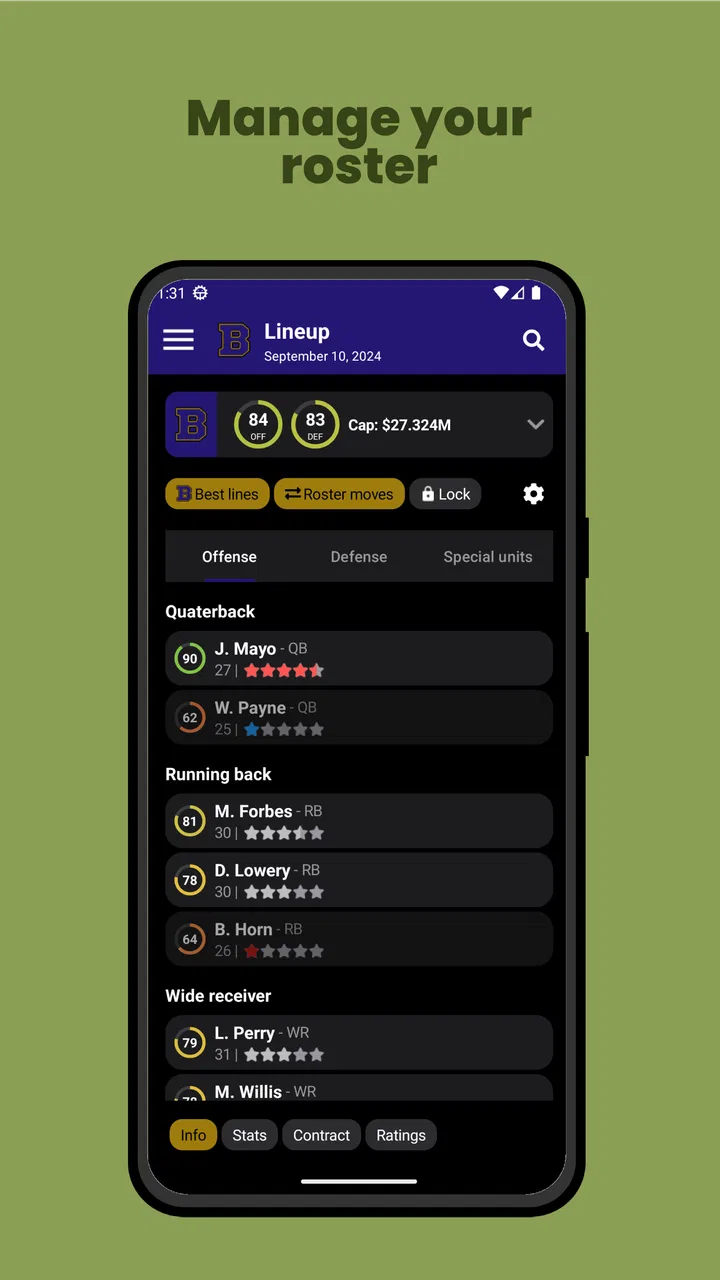
Football Legacy Manager 25 is the kind of sports game I open when I want to think like a team builder rather than control every play on the field. It puts the focus on the general-manager side of American football: shaping a roster, making decisions over time, and trying to leave a stronger organization behind than the one I started with. That makes it a very different experience from an action-focused football game, and it is worth understanding that difference before downloading it.
I tested it with the expectations I would have for a management game, not a traditional arcade football title. The appeal is in planning, reviewing choices, and accepting that a season can turn on decisions made several steps earlier. The game is free to install, carries an Everyone age rating, and is developed by Hockey Legacy Manager. Despite the developer name, this release is built around American football management rather than hockey.
The Android listing shows a 4.0 average from 111 ratings and more than 10K installs. That is a modest but useful signal: there is already a small audience trying it, although it is not a huge mainstream sports release. The current version is 25.1.19, and it requires Android 6.0 or later. Optional in-app purchases range from $4.49 to $10.99 per item, so I would approach it as a free starting point with paid extras rather than assuming every part of the experience is completely cost-free.
You May Also Like

 AccuWeather: Weather Radar
AccuWeather Review: A Quick, Clear Forecast for Everyday Decisions
For everyday plans, the best forecast is the one you can understand quickly. AccuWeather makes rain timing, radar, and local conditions easy to act on, with a few trade-offs.

 Hill Climb Racing
Why Hill Climb Racing Still Turns Crashes Into One More Run
A tiny car, a bumpy hill and one more upgrade: Hill Climb Racing keeps resurfacing because its simple chaos makes every near-miss feel personal.

 AliExpress - Shopping App
AliExpress Makes Global Shopping Feel Personal, but Shoppers Bear the Risk
AliExpress turns a global marketplace into a pocket-sized discovery engine. Its reach is useful, its shopping loop compelling, and its trade-offs easy to miss.

 Lords Mobile: Kingdom Wars
Lords Mobile Is a Kingdom-Building Routine, Not a Quick Match
A case-by-case verdict on the building, battles, device demands, and social commitments that make Lords Mobile rewarding for some players and exhausting for others.

 PDF Scanner app - TapScanner
TapScanner Makes Paperwork Easier to Capture, Check, and Share
TapScanner makes scanning with a phone feel less like a rescue operation and more like a dependable step in getting work done. Its capture tools are useful, though not flawless.

 Block Blast!
 Shows How Much a Puzzle Game Can Leave Out
A quiet grid game shows why puzzle players increasingly value instant clarity, repeatable skill and low-pressure play—and where the genre still needs to catch up.
More From Our News Desk
View All News


Getting past the first points of friction
The first difficulty is not necessarily technical. It is knowing what sort of game you have installed. If you expect immediate matches, simple controls, or a quick path to scoring touchdowns, the opening experience may feel slow or indirect. A management simulator asks you to read screens, compare choices, and understand consequences. I found that the best way to begin was to treat the first stretch as orientation instead of trying to optimize everything immediately.
That change in mindset matters because a general manager does not play the same role as a quarterback or coach during a single possession. You are making decisions that affect the shape of a team, and the reward comes from seeing a plan develop. Someone who enjoys roster construction and long-term thinking will probably settle in faster than someone looking for short sessions of hands-on football.
Before blaming the game for a poor start, I would check the basics. Confirm that the phone is running Android 6.0 or newer, make sure the installation completed normally, and leave enough free storage for the device to operate comfortably. These are simple checks, but they prevent a surprising amount of confusion when a game opens slowly, closes unexpectedly, or does not behave consistently after installation.
I would also avoid judging the experience while several other demanding apps are open. A management game may not look visually intense, yet background activity, low memory, or an overloaded device can still affect loading and responsiveness. Closing unused apps, restarting the phone, and opening the game again is a sensible first step before changing anything more drastic.
Another useful setup habit is to use a stable connection during the initial installation or update process. If the game has just been downloaded or updated, waiting for the process to finish fully is better than opening it repeatedly while the device is still working. If an update seems stuck, checking the app store, restarting the device, and trying again later is safer than immediately clearing data or reinstalling.
How to begin without creating unnecessary problems
My practical advice is to make your first session exploratory. Look through the available management screens and learn where the important decisions live before spending time trying to build a perfect team. In a game like this, rushing through the opening choices can make later confusion feel like a bug when it is really an unfamiliar workflow.
I would also keep a simple mental record of what I changed. If the team begins performing differently after several decisions, knowing which choice came first helps you understand cause and effect. This is one of the less obvious strengths of a management game: you can learn from your own process, not just from the result of one match.
Do not assume that every disappointing result means the roster is weak. A management decision can have a delayed effect, and a single outcome is not enough to judge a whole strategy. I prefer to look for patterns across several decisions and then adjust one area at a time. Changing everything at once makes it difficult to know what actually helped.
Because the game is free, I would also spend time with the core experience before considering an in-app purchase. The listed purchases cost between $4.49 and $10.99 per item, which is meaningful if you are only casually curious. First decide whether you enjoy the management loop. Paying to move faster or expand an experience you do not yet understand is an easy way to create buyer’s remorse.
A realistic everyday session
For me, the most realistic use case is a short evening session after work or school. I might open the game with enough time to review the team, make one or two deliberate decisions, and then stop rather than trying to complete everything in one sitting. That rhythm suits the subject matter: the fun comes from returning to a developing organization, not from exhausting every option immediately.
It also works for someone who likes sports podcasts, league discussions, or fantasy-style analysis but wants a more structured game. You can approach each session with a question: should I strengthen a weak area, protect future flexibility, or stay with a plan that has not had time to mature? Even without controlling each play, those questions give the game a satisfying sense of involvement.
The trade-off is that it may not be ideal for a commute with unreliable connectivity or for a person who wants instant action. If your available gaming time is measured in a few seconds, a tap-heavy arcade game will probably be a better fit. This one asks for attention, and its slower pace is central to the experience rather than a flaw that can be removed.
Recovering when a session goes wrong
When the game fails to open or behaves strangely, I would use a gradual recovery process. First close it completely and reopen it. Then restart the phone and check whether the store shows a pending update. These steps are deliberately ordinary, but they are less risky than immediately deleting local information.
If the problem started after an update, I would note exactly what changed: did the issue happen during launch, while moving between screens, or after a particular action? That detail helps separate a general installation problem from a problem tied to one workflow. It also prevents random troubleshooting, where several changes are made and the original cause becomes impossible to identify.
Clearing an app’s cache can sometimes help with temporary loading trouble, but I would be careful with any option that mentions clearing storage or data. In a management game, progress is valuable, and deleting local data may remove information that has not been backed up elsewhere. I would only take that step if I understood the consequence and had accepted the possibility of losing the current save.
Reinstalling should be a later option, not the first one. It can repair a damaged installation, but it can also create unnecessary risk if progress is stored locally. Before removing the game, I would check whether the game itself offers any account, save, or recovery method and make sure I am comfortable with the result. I would not assume that reinstalling automatically restores a career.
The same caution applies to switching devices. A management career can feel personal because it represents many decisions over time. If you plan to move from one phone to another, verify the available recovery route inside the game before wiping the old device. The safest general rule is simple: protect progress first, troubleshoot second.
When the app may not be the cause
Not every failure belongs to the game. A phone running close to full storage, an unstable network, aggressive battery management, or an operating-system issue can create symptoms that look like an app defect. If other apps are also freezing or loading slowly, I would investigate the device before focusing only on Football Legacy Manager 25.
Battery-saving settings can be especially confusing. If the game stops working after being left in the background, the phone may have suspended it to conserve power. Opening it again after a restart is a reasonable test. I would avoid changing several system settings at once, because that makes it harder to identify whether the problem came from the game or from the device’s background restrictions.
Storage is another practical issue. A phone can appear to have enough room for the initial download but still struggle when temporary files or an update need additional space. Removing unused downloads and restarting before trying again is a safer approach than repeatedly tapping the install button. This is not unique to this title, but it matters more when you are trying to preserve a long-running management career.
There is also a difference between a design choice and a malfunction. A screen that requires several taps, a result that takes time to develop, or a menu that expects you to review information before proceeding may feel inconvenient if you prefer action games. That does not necessarily mean the application is broken. I would give the management flow a fair session before deciding that its pace is a technical problem.
What makes the management approach worthwhile
The strongest part of the game is the change in perspective. Instead of reducing American football to quick reactions, it asks me to think about the organization as a continuing project. That creates room for deliberate choices and makes setbacks more interesting. A poor result can become a lesson about planning rather than just a lost contest.
A useful technique is to define a short-term priority before making changes. For example, I might decide that this session is about stabilizing one weakness rather than rebuilding the entire team. That narrow goal reduces decision fatigue and makes the next result easier to interpret. It is a small workflow improvement, but it helps the game feel less like a collection of menus and more like a coherent management challenge.
I also prefer making changes in stages. If I alter several parts of the team at once, I lose the ability to judge which decision mattered. By adjusting one area, reviewing the outcome, and then choosing the next move, I get a clearer sense of the game’s logic. This approach may feel slower, but it is better for players who want to learn rather than simply chase a quick result.
Another trade-off is emotional distance. If you need direct control over the action, the general-manager role may never feel satisfying, no matter how polished the management layer is. On the other hand, if you enjoy imagining how a club develops over time, the indirect control becomes the reason to play. I would place it closer to a sports strategy hobby than to a conventional football match simulator.
Who should choose it, and who should skip it
I would recommend it to players who enjoy building a team, comparing options, and returning to a project across multiple sessions. It is also a reasonable choice for an American football fan who wants something more thoughtful than a quick match but does not need a large visual presentation to stay engaged.
I would be more cautious if you dislike reading management information or making decisions without immediate feedback. The free entry point makes it easy to try, but free does not mean effortless. You still need patience to understand the structure, and the optional purchases mean you should decide your spending limit before becoming invested.
Players looking for a simple pick-up-and-play sports game should probably choose an arcade alternative. Those games are better when the goal is immediate control, fast rounds, and obvious action. Football Legacy Manager 25 is better when the goal is to imagine the work behind a team’s identity and accept that progress is measured through decisions rather than constant excitement.
My practical verdict
Football Legacy Manager 25 is worth trying if you want American football strategy rather than on-field control. I like its focused premise and the way it turns the sport into a long-term planning exercise. The free starting point lowers the barrier to testing that idea, while the Everyone rating makes it approachable for a broad audience.
My recommendation is to install it on a compatible Android device, begin slowly, and treat the first session as a learning pass. Check your operating-system version, keep the phone reasonably clear of storage and background load, and avoid deleting app data while troubleshooting. If a problem appears, restart and check for updates before taking more destructive steps.
After that, judge it by the question it is designed to answer: do you enjoy making the decisions that shape a football organization? If yes, the slower general-manager perspective can become surprisingly absorbing. If you want to control every play or finish a complete experience in a few minutes, another sports game will serve you better. For the right player, this is a patient, free-to-start management game with enough room for careful planning—and enough friction to reward anyone willing to learn its workflow.
FAQs for Football Legacy Manager 25
01What is Football Legacy Manager 25?
Football Legacy Manager 25 is a football management simulation game focused on building and controlling a club over multiple seasons. Instead of directly playing matches, you take responsibility for areas such as transfers, tactics, training, contracts, finances, and squad development. The game is designed for players who enjoy making long-term decisions and seeing how their choices shape a club’s future.
02Can I play Football Legacy Manager 25 offline?
Football Legacy Manager 25 is generally designed as a single-player management experience, so many of its core features can be enjoyed without constant internet access. However, certain functions may depend on connectivity, including updates, cloud-related services, advertisements, or purchases. Before relying on offline play, it is worth checking the current store description and testing the game after installation with your device disconnected.
03Does Football Legacy Manager 25 include real players, clubs, and leagues?
The game offers a detailed football-management world, but the availability of officially licensed clubs, competitions, and player names can vary. Some databases may use fictional or modified content rather than full real-world licensing. This is important if you expect an officially branded experience. Players who enjoy tactics and squad building will still find the simulation engaging, even when names or teams are not completely authentic.
04Is Football Legacy Manager 25 suitable for beginners?
Football Legacy Manager 25 can be enjoyed by newcomers, although its many menus and management decisions may feel demanding at first. You may need time to understand scouting, player roles, training schedules, finances, staff responsibilities, and match preparation. The best approach is to begin with a manageable club, avoid changing too many systems at once, and learn from results rather than trying to master every feature immediately.
05Are there in-app purchases or advertisements in Football Legacy Manager 25?
The monetization system can depend on the version available for your Android or iOS device. Football management games commonly include optional purchases, advertising, or premium features, so you should review the official store listing before downloading. Check whether purchases remove ads or unlock content, and remember that optional spending is not normally required to understand the main management systems and enjoy a complete career.
Pros
- Deep squad management with transfers
- contracts
- tactics
- and player development.
- Large database of clubs and players creates plenty of career possibilities.
- Matches progress quickly
- making it easy to manage several seasons.
- Useful statistics help you evaluate form
- performance
- and team balance.
- Offline-friendly design suits players who want a manager game anywhere.
Cons
- The interface can feel dense and takes time to learn for new players.
- Match presentation is limited compared with more visual football games.
- Some menus require frequent navigation when handling a large squad.
- Long-term saves may become repetitive once your club dominates its league.
- Advanced features and content may be restricted behind in-app purchases.

Football Legacy Manager 25
Gallery